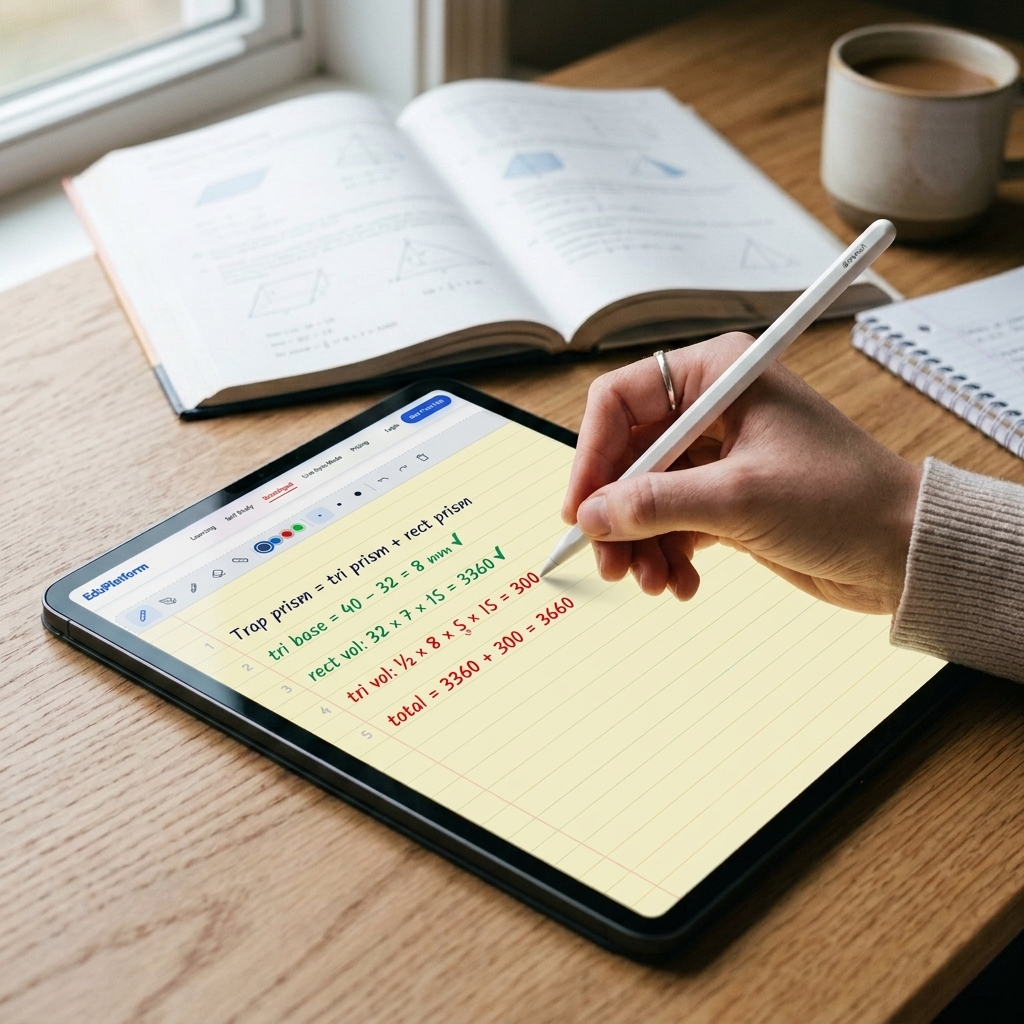
Students write their work directly on screen. Beside Math reads every line, finds the exact mistake, and guides them to correct it — without giving away the answer.
See how it works ↓What is the Scratchpad?
The Scratchpad is a lined digital workspace inside every problem. Students write their full calculation process — step by step — just like pencil on paper. Beside Math checks each line automatically.
Apple Pencil
Full pressure sensitivity
Beside Math is built for iPad and Apple Pencil. Students don't type — they write. Every calculation step, every formula, every scratch mark is captured on the lined digital pad, exactly as it would be in a notebook.
Full-page lined scratchpad
Large, uncluttered writing area — room for multi-step problems, diagrams, and side calculations.
Pencil · Pen · Marker · Eraser · Ruler
Five tools, four ink colors, three stroke widths — everything a student needs to show their thinking clearly.
Line-by-line error detection
Beside Math reads the handwriting, finds the exact wrong step, and marks it with a red arrow — no guesswork.
Erase and rewrite — not start over
The eraser removes just the wrong line. Students fix, recalculate, and resubmit — building understanding through correction.
A 7th grader is solving a volume problem. They've shown all their working in the scratchpad — but made a small error on line 4 that throws off the final answer.
7th Grade Math · Volume
3,660 mm³ is not correct. Check your working and try again.
Step 1 — Done
Break the prism into a triangular section and a rectangular section.
Step 2 — Done
Rectangular volume: 32 × 7 × 15 = 3,360 mm³
Current Step
Triangular volume: ½ × base × height × depth
Step 4
Add both volumes together to find the total.
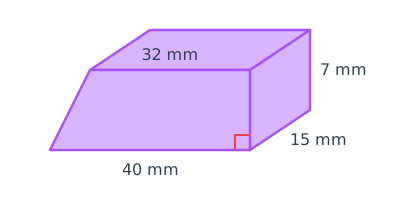
The student used height = 5 mm on line 4 instead of the correct 7 mm. The wrong intermediate value cascades into a wrong total on line 5. To a human looking at it quickly, it's easy to miss — but Beside Math catches it in milliseconds.
The student clicks "Check What Was Wrong." Beside Math scans every line of the scratchpad and places a red arrow on the exact line where the mistake occurred.
7th Grade Math · Volume
⚠ Error on Line 4
Height used: 5 mm — but the diagram shows the height is 7 mm.
Correct: ½ × 8 × 7 × 15 = 420 mm³. Fix line 4 and recalculate your total.
Step 1 — Done
Break the prism into a triangular and rectangular section.
Step 2 — Done
Rectangular volume: 32 × 7 × 15 = 3,360 mm³
Step 3 — Needs Fix
Triangular volume: check the height value used.
Step 4
Add both volumes together.
The red arrow points directly at line 4. The error callout explains exactly what went wrong — "Height used: 5 mm, should be 7 mm" — and shows the correct formula. The student still has to fix the number and recalculate; the system doesn't do it for them.
The student fixes their handwriting on line 4, recalculates line 5, and submits the correct answer. Every line is now green.
7th Grade Math · Volume
3,780 mm³ — correct!
Great work fixing line 4. The correction cascaded perfectly into line 5.
Step 1 — Done
Break into triangular and rectangular prism.
Step 2 — Done
Rectangular volume = 3,360 mm³
Step 3 — Done
Triangular volume = ½ × 8 × 7 × 15 = 420 mm³
Step 4 — Done
Total = 3360 + 420 = 3,780 mm³
The student didn't just get the right answer — they understood why their original answer was wrong. By correcting line 4 themselves, the concept of reading a diagram for the correct height is reinforced far more effectively than simply seeing the answer provided.
The difference between "you got it wrong" and "here's exactly why" is the difference between frustration and growth.
Line 4
Exact location found
Not "somewhere in your work" — the system identifies the specific line number where the calculation failed.
5 → 7
Specific value highlighted
The wrong number is underlined with a wavy red mark. Students see exactly which value to reconsider.
Self-fixed
No answer given away
The hint explains the mistake; the student still recalculates — building real, lasting understanding.
Enter your answer, make a mistake, and experience the analysis in action — live.